For people with limited uses of their hands using a mouse can be difficult if not impossible. People who do not have hands or who are paralyzed can not use a mouse. Camera Mouse solves this problem. Camera Mouse is a free application for Windows computers. Camera Mouse uses a web camera to track the users head and move the mouse on the screen. Camera Mouse requires small head movements to move the mouse around the screen with out using their hands. To click with Camera Mouse the users blinks their left eye for a left click and blinks their right eye for a right click. To download Camera Mouse click here. Camera Mouse makes Windows computers accessible for users that can not use a mouse.
Wednesday, August 10, 2011


Tuesday, August 9, 2011
iOS Refreshable Braille Display Support
iOS has support for refreshable Braille displays. A Braille display allows a blind user to access the device. Refreshable Braille displays are compatible with the iPhone, iPod Touch and iPad. The Braille displays connect to your iOS device via Bluetooth. The pairing process is simple and quick. When the Braille display is connected to the device the Braille display can control the VoiceOver cursor on the display. The VoiceOver cursor can be used to select and read items on the screen.. Braille display compatibility allows blind users to access the information of their iOS device. For a list of compatible Bluetooth Braille displays click here. Watch the above video to learn more.
Monday, August 8, 2011
Digital Librarian is a One Stop Shop For Digital Publications

Digital Librarian is a list of free online material sorted by category. Digital Librarian includes resources from around the web. When you click on a topic that interests you a long list of websites comes up. Digital Librarian is perfect for research projects. Once you have found an article you would like to read you can use a text-to-speech program to read it to you. Digital Librarian helps you find digital content quickly and easily. For more on digital library content click here.
Sunday, August 7, 2011
iOS 5 to Include Hearing Aid Mode
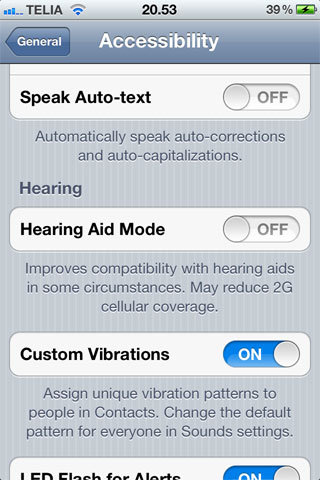
Yesterday, Apple released iOS 5 beta 5 to developers. One of the new features is hearing aid mode. Hearing aid mode will allow the iPhone to work better with hearing aids. In order to activate the setting in iOS 5 go to setting then general and then accessibility. iOS 5 is expected to be released in the fall to the general public. To learn more about the many iOS 5 accessibility options click here.
Saturday, August 6, 2011
iTunes U Helps Students

iTunes U is a free service that helps anyone who wants to learn. iTunes U allows any user to download lectures and PowerPoints from some K-12 schools and many collages and universities. To download a class lecture from iTunes U, search for the topic or school you are looking for in iTunes. iTunes U is great for collage students who want to watch lectures again. iTunes U allows you to watch your lectures on a Mac, PC, iPod, iPhone or iPad. iTunes U can also help people learn about a new topic without going to a physical classroom. iTunes U is simple for both the institution and the student. Apple descrbies iTunes you as,
"iTunes U brings the power of the iTunes Store to education, making it simple to distribute information to your students and faculty — or to lifelong learners all over the world. With an iTunes U site, your institution has a single home for all the digital content created or curated by educators, which can then be easily downloaded and viewed on any Mac, PC, iPod, or iPhone."iTunes U can help any student excel with its wide ranging topic areas and content uploaded by schools. Apple explains iTunes U's universal access,
"iTunes U can be a powerful and accessible learning tool for students with disabilities. For the vision-impaired, iTunes U works with VoiceOver, the built-in screen reader on the Mac, as well as with compatible screen readers on PCs. iTunes U also allows for learning with iPod and iPhone, which offer features to help vision-impaired students find the information they need (using VoiceOver on iPhone and iPod touch, and spoken feedback on iPod nano and iPod shuffle). And for students with physical or motor-skills needs, iTunes U brings the classroom to them, so they can learn at their own pace and in a more comfortable environment."To try iTunes U go to the iTunes store on any computer or iOS device. To read Apple's iTunes U web page click here To see more pictures of iTunes U click read more.
Friday, August 5, 2011
Speech Recognition Extensions For Chrome

The Chrome browser by Google is well liked by many users. To download Chrome click here. Now there are many extensions that allow you to speech your text into any webpage. This feature is enabled for Google search by default in Chrome. To read more about Google voice search click here. With an extension such as Voice Search you can add voice search to any text box on any page. To download the Voice Search extension click here. Voice input is very helpful for people who have trouble spelling or for people who have trouble using the keyboard. To watch a video about Google voice search click read more below.
Thursday, August 4, 2011
ChromeShades Helps Web Developers Make Accessible Websites

ChromeShades is an extension on the Chrome Web Store. ChromeShades helps website developers make accessible websites by taking out all visual elements and displaying the webpage as a screen reader or Braille display would recognize the page. ChromeShades helps web developers recognize accessibility problems with their site. Chrome frame is free on the Chrome Web Store.
If you have found any accessibility problems with this site please leave a comment including where the problem occurred and what browsers you were using.
Wednesday, August 3, 2011
Ultra-Thin Braille Displays Coming Soon


Braille is a system of raised dots that makes up the alphabet. Braille is the way that people with low vision and who are blind read text. Braille books are very thick and heavy compared to their print counterparts. Currently Braille users are using refreshable Braille displays to read Braille. A refreshable Braille display uses small dots that pop up in the appropriate place to make a Braille letter. Currently refreshable Braille displays are large and bulky. Now Someya Labs in Japan has found a way to shrink the refreshable Braille down to credit card size. The new displays have a 24 character display that can fit into your wallet or pocket. The new display dubbed "sheet Braille display" is not on the market as of this post. With this new smaller Braille display Braille users will be able to easily take it with them wherever they go. Click read more below or to watch/listen to a video about the new display.
Tuesday, August 2, 2011
Skype for iPad Now Available
Skype, the most popular video chat service just released a Skype for iPad. The app supports video calls on the iPad 2 over Wi-Fi and 3G data. To download the app click here. With Skype you can chat with other users using many other devices. Skype supports iPad, iPhone, iPod Touch, Android, Windows and Mac OS X. The Skype calls are free but data rates do apply while using 3G. Video chat services such as Skype are useful for people who are are deaf. Deaf users of Skype can sign within the video chat in order to communicate. With more video chat options communication between users is becoming easier for all users.
Besides Skype there are many other options for video chat. Facebook recently announced video calling from within the Facebook site. Apple also has FaceTime for users of its iPad 2, iPhone 4, iPod Touch 4th generation and Mac computers. FaceTime will be able to work over 3G in iOS 5 which is coming out this fall. Click here to learn more about iOS 5.
With new options for video chatting, remote communication is becoming easier for deaf users. Click read more below to see a video of Facebook video chat and FaceTime.
Monday, August 1, 2011
Android Voice Search
Android phones are becoming more and more popular. Android phones do not have built-in accessibility features like the iPhone, iPad and iPod Touch. iOS devices have many built-in accessibility features but Android phones do not. One feature that Android phones do include is voice input. With voice input you can touch the microphone next to the space bar and speak your text. A similar feature is a available with Google Chrome (click here). Voice input is a helpful feature for people who struggle to spell or have physical disabilities that makes typing difficult. You can access voice input wherever there is a keyboard on Android by pressing the microphone button next to the space bar. iOS does not have system wide voice input but it is rumored to be coming in the upcoming iOS 5 this fall. If you have an iPhone, iPad or iPod Touch you can use the Dragon Go! app to get similar features.
Subscribe to:
Posts (Atom)