Pages

Friday, June 20, 2014

Amazon Announces Fire Phone with Advanced Image Recognition and Built-in Accessibility

Courtesy: Amazon.com

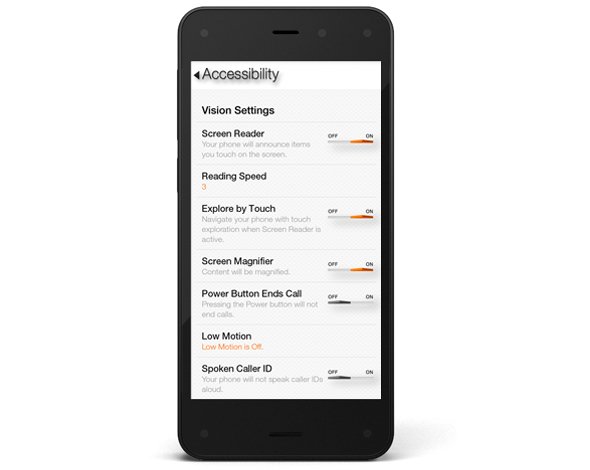
This week, Amazon announced there first smartphone called Fire Phone. The Fire Phone has a number of flashy, maybe even gimmicky, features along with a few features that may have serious accessibility implications. The phone which starts at $200 and starts shipping on July 25th runs Fire OS 3.5.0 similar to Amazon's Kindle Fire tablets. The operating system includes a number of built-in accessibility features including features to help blind, low vision, mobility impaired, and hearing impaired users. For blind and low vision users, the Fire Phone includes a screen reader which allows users to navigate the screen without seeing it. Assuming the Fire Phone uses the same text-to-speech voices as the Kindle Fire tablets, the text-to-speech voice used is very high quality. For low vision users, the Fire Phone includes a zoom mode and high contrast support. Closed captioning, mono audio, and hearing aid compatibility (HAC) are features included for users with hearing impairments.The Fire Phone also includes features for users with mobility challenges including dictation and improved one-handed usability. It is very encouraging to see Amazon include accessibility features in to their Fire Phone. Click here to read a full overview of all the Fire Phone's accessibility features. Amazon, once reluctant to support accessibility, has shown a new dedication to accessibility for users with disabilities. Hopefully, this continues in future updates to the Fire OS as well as to future products.

In addition to dedicated accessibility features, the Fire Phone has a couple of mainstream features that could be potentially beneficial to people with disabilities. The first of these features is called Mayday. Mayday is currently available on newer Kindle Fire tablets allows users to quickly connect and chat with technical support directly from their device. Simply by pressing the easy to access Mayday button users are atomically connected. Technical support staff can access certain device functions to assist users with a variety of questions. Support staff can even virtually draw on the screen to draw your attention to certain buttons. In my testing, I was able to connect with Mayday staff in under a minute and the staff was knowledgeable and friendly. The support personnel were even knowledgeable about accessibility features. This feature could be great for users with cognitive challenges who need assistance using certain features on their phone.

The second feature is called Firefly. By pressing a dedicated button on the side of the device and pointing the camera at an object the Fire Phone can identify that object. Amazon demonstrated this feature at their even and it worked very quickly. Firefly could be used by the blind to identify objects and differentiate objects of similar size and shape. For example, to identify if a can contains chicken soup or sliced peaches. Similar to iOS apps like TapTapSee, Firefly is Amazon's attempt to make buying merchandise through Amazon an easier process.

The Fire Phone seems promising, but it is impossible to determine its true value in terms of accessibility until it is released next month. Until then, click read more to view videos of the Fire Phone in action.

Thursday, June 19, 2014

Kindle App for iOS and Android Adds Whispersync for Voice


Amazon's Kindle app for iOS and Android was recently updated to integrate audio books from Audible. The update, which is available for free, allows users to seamlessly switch between reading the Kindle text version of a book to listening to the Audible audio version of a book. For example, if you read part of the book and then switch to the audio version the recording will pickup right where you left off. The new feature even allows users to listen to the audio book while following along with the text version. Audio speaking rate can be increased or decreased according to user preference. Unfortunately, unlike Immersion Reading on Kindle Fire tablets, the Kindle app for iOS and Android does not highlight the text as it is being read allowed. While this may not be an inconveniences for some users, it could be a major omission for users with tracking difficulty. For now, users will need a Kindle Fire tablet to take advantage of the full Immersion Reading experience. To learn more about Immersion Reading click here. There is one another major caveat: price. In order to take advantage of Whispersync for Voice or Immersion Reading on a Kindle Fire, you must purchases both the Kindle and Audible versions of a book. This can become extremely expensive for the occasional reader let alone a book worm.

To download the app for iOS click here and to download the app for Android click here. To view screenshots of the app in action click read more below.

Monday, June 2, 2014

iOS 8 Accessibility Roundup: More Accessible Than Ever

Credit: Apple
Credit: AppleToday, Apple previewed iOS 8, the next operating system for iPhone, iPad, and iPod touch. iOS 8 builds on existing accessibility features to offer some exciting new possibilities for iOS users with disabilities. Many websites will have general information about iOS 8, but this post will focus on accessibility related changes to iOS. iOS 8 includes new keyboard options, improved text-to-speech voices, improved Guided Access features, and improved Siri functionality among other accessibility related features. Apple can always add or alter features before the general release. The new operating system will be available this fall for the general public.

QuickType and Keyboard

Apple's iOS 8 will include a built in predictive keyboard called QuickType. This new software keyboard will predict words for the user as they type. Once the word you want to enter appears in the suggestion bar above the keyboard, you simply tap it to insert that word. This feature will cut down on key strokes needed to enter words which will benefit people with dexterity challenges. QuickType even takes context into account so if your typing an email it will suggest more formal language that if you are writing a text message. QuickType will be similar to the Co:Writer app, but will work across all apps on your devices.

In addition to Apple's own QuickType keyboard, iOS 8 will allow third-party developers to develop keyboards for system wide use. For example, Fleksy could be updated to work with every app on the iPhone or iPad. This flexibility gives users with different abilities the opportunity to switch keyboards to one that fits their needs. For users who are blind or visually impaired downloading the fast and accessible Fleksy keyboard may allow them to more easily enter text.

Health

iOS 8 takes big steps to help people manage data associated with their health. Users can input data into the health app through third-party health monitoring devices like a blood pressure reader or through apps. This data can then be automatically shared with doctors and other health care professionals to help insure timely and appropriate care. For instance, if a blood pressure or glucose reading was outside of a normal range, a doctor could be automatically alerted. This could help people with chronic conditions live more independently especially in their later years.

The health app will include another life saving feature called "in case of emergency card." This information card will be accessible from the lock screen and will allow first responders and emergency room doctors important health information in the case of an emergency. The card can include a photo, medical conditions, allergies, current medications, and more all to give life saving information to emergency medical personnel.

Credit: Apple

Family Sharing

Family sharing will allow families with multiple iOS 8 devices to manage their iOS devices more harmoniously. Parents will be able to set up home sharing to monitor their child's physical location or to share purchased content from the iTunes store among members of the family. Children will also have to ask parents permission before purchasing an app.

Spotlight Search

Spotlight search is an existing feature in iOS 7, but in iOS 8 it gets supercharged. Spotlight in iOS 8 will give Siri-like answers. Unlike Siri, which uses voice input, spotlight uses text input. This new form of input gives users with speech impairments the ability to type, instead of speak, queries and get meaningful results.

Touch ID

iOS 8 improves Touch ID by allowing third-party apps to unlock information using just a user's fingerprint. Touch ID is currently used for unlocking your device and making iTunes purchases. This feature already is great for blind users because it offers secure authentication without having to type, which can be a slower process with VoiceOver. In iOS 8, the ability to access third-party apps with just a finger print will expand on the already very accessible Touch ID feature of iOS 7.

Siri
iOS 8 will also bring improvements to Siri. Most notably, users will be able to activate Siri hands-free by saying "Hey, Siri." This new hands-free voice command may benefit people that have trouble activating the home button. This always listening feature is similar to Google's advanced voice search.

iOS 8 will also offer faster dictation that appears on screen as you speak. This new feature will prusumably work with Siri and in app dictation.

Much More
Credit: Apple

iOS 8 will also include features that Apple did not have time to fully preview during their keynote. The first one included in the keynote was "Braille Keyboard for direct 6-dot Braille input." Other accessibility related features include the ability to use the advanced and high quality Alex voice. The Alex voice is currently available for the Mac and many users enjoy its high quality. iOS 8 will also include improved zoom for accessibility, but no further details on this feature where offered.

iOS 8 will also include some enhancements to Guided Access. Guided Access is a feature that locks a user into a single app. This is great for teachers administering tests on an iPad or parents of kids who are easily distracted. In iOS 8, users will be able to use Touch ID to exit from Guided Access. Users will also be able to use time limits and countdown timers to control Guided Access.

Another feature listed is "Speak screen," a somewhat mysterious feature than did not garner any further explanation from Apple. Speak screen may be a brand new accessibility feature or maybe unrelated to accessibility, but the name seems to imply some link to accessibility.

Saturday, May 31, 2014

Ginger Page for iPhone: Powerful Spelling and Grammar Correction


Ginger Software, the maker of the powerful spelling and contextual grammar checker "Ginger" has released an iPhone app called Ginger Page. Ginger's technology can correct mistakes that common spell checking software would not detect. Ginger does this by analyzing the context of the text being written. For example, if you are writing about drafting a school essay Ginger will suggest that you use "write" instead of "right." From my testing, Ginger also seems much better at suggesting and correcting punctuation than other editing software. Ginger Page can also read your writing back to you using text-to-speech, which can be a powerful proof reading tool, especially for those with dyslexia. Once you have completed your writing, you can share it by text message, email, or open it in another compatible app.

While the Ginger correction software is very good, the app has some notable omissions. Ginger Page is only available for iPhone which is perplexing for a writing focused app. The iPad's larger screen would make the writing experience much easier. Also, Ginger requires an internet connect to correct your writing. You can still type into the app without an internet connection, but no corrects will be offered. 

Since, Ginger Page is a free app its a no brainier to download it if you need extra spelling and grammar help. Click here to download Ginger Page. Watch the above video above to see Ginger Page in action and click read more below to view screenshots of the app.

Monday, May 26, 2014

Apple Begins Hosting Free Accessibility Workshops


Recently, select Apple Retail Stores have started hosting free accessibility workshops. The hour long sessions are instructed by Apple Store employees and cover various accessibility features included in iOS 7 and OS X Mavericks. Workshops are divided based on the user's needs and include hearing, vision, and physical and motor skills. These workshops will presumably cover features such as VoiceOver, Assistive Touch, Switch Control, and more.

These workshops are a great way for Apple customers to learn about helpful accessibility features that are already built into their devices. The workshops will also offer users of Apple's accessibility features an opportunity to get their questions answered in person. The training of the workshop instructors will be key to a successful experience. Hopefully, these workshops will be offered in all Apple Stores in the near future. While accessibility specific workshops may not help Apple's bottom line, they demonstrate Apple continued commitment to accessibility.

Click read more below to view descriptions of the available sessions.

Thursday, May 8, 2014

Google's Project Ara Smartphone has Tremendous Accessibility Potential


Google's futuristic modular smart phone has the potential to dramatically change how we think of electronics. The still unreleased phone call Project Ara has a interior metal structure with slots for different components to connect. For example, modular components could house a camera, battery, touch screen display, or speaker. These components snap into place making a relatively standard looking smartphone. Consumers could purchase components and assemble them to make a personalized smartphone. The phone allows consumers to exchange a component for extra battery power or a more powerful camera depending on the situation.

With such customizable hardware, the Ara phone could adapt to fit the needs of people with various disabilities. If users have a hearing impairment they could add a louder speaker component. Conversely, if a user is deaf there is no need to waste space with a speaker when the space could be used for something more useful. The possibilities are almost limitless. A blind user could possibly opt not to have a touch screen display in favor of a refreshable Braille display. Users with dexterity challenges could add a tactile keyboard.

While Project Ara sounds promising for people with disabilities, the implementation is key. Will third party hardware developers make specialized components for people with disabilities at an affordable price? Can Google successfully configure Android to work properly with any assistive add ons third parties make?  Project Ara phones won't be available for for many months, but the project offers some exciting possibilities.


Click read more below to learn more about Project Ara.

Thursday, April 17, 2014

EU Regulation Requiring Hybrid and Electric Cars to Make Artificial Noise Will Improve Safety for Blind Pedestrians


Hybrid and electric cars pose a major safety challenge for pedestrians. The cars, which use electric motors, make very little noise, making them almost impossible for blind pedestrians to detect. Electric cars are gaining in popularity due to their energy savings and improving affordability. In response to the increased threat quite electric cars are posing, the European Union (EU) is preparing to mandate electric and hybrid cars have noise alerts for pedestrians. By 2019 cars sold in the EU will be required to include audio alerts. While the implementation of the rule is still four years off the importance is sure to only grow as electric cars become more and more popular.

America has yet to require audio alerts for electric cars, but legislation has been proposed. Hopefully, the EU's changes will spur electric car makers to add audio alerts to their cars and improve the safety for pedestrians everywhere. As seen in the above video some cars such as Nissan's electric car already offers pedestrian alerts.

Sunday, April 13, 2014

Learning Ally Audio Update Includes Background Audio Support


Learning Ally, a provider of audio books for the blind and dyslexic, recently updated their iOS app. The free apps allows Learning Ally members to listen to their audio books while on the go. The new update brings a valuable  new feature to the app. Now, the app allows users to listen to their audio books while using other apps at the same time, a feature commonly called background audio. The update provides a more consistent experience for users who have come to expect background audio support in all apps. With the update users can listen to an audio book while looking up information on the internet, reading a note page, or even responding to an occasional text message. Along with background audio support comes the ability to control playback using control center or a headphones with a remote. The update is available for free and is compatible with iPhone, iPad, and iPod Touch. To take advantage of the app users must be members of Learning Ally. To learn more about Learning Ally click here.

Friday, April 4, 2014

iPad mini, Nexus 7, or Kindle Fire HDX: Which Tablet is Best for People with Dyslexia?


Over the past couple of weeks I have been lucky enough to review three of the most popular tablets- the iPad mini, the Nexus 7, and the Kindle Fire HXD. Instead of focusing on battery life, pixel density, and processor speed, I took a look at the features that would help people with dyslexia and other disabilities. All three tablets have some features that are perfect for dyslexics. To figure out which one is right for you, think about which features are most important to you as you read the reviews.
Overview:

When looking for a tablet for someone with dyslexia, there are a number of important factors that must be considered to make sure you get the features that are most important to the user, and get the best value for your needs. First, you want to consider what the tablet will be used for. Will it be used primarily for reading books and browsing the web, or will it be used to type documents, read email, and edit movies. 
Generally, for people with dyslexia, it is important that the tablet have built in text-to-speech with a high quality voice. All three of these tablets have text-to-speech, but the way text-to-speech is implemented is different from tablet to tablet. The iPad allows text-to-speech to be activated in a few taps when reading webpages and text in apps including Safari, Mail and many third party apps including The New York Times. The other tablets require a more time consuming process to activate text-to-speech in all apps.

Next, app quality and quantity is also an important consideration. Currently, the iPad is ahead in terms of app support, but the Nexus 7 is not too shabby in terms of third party app selection either. Apple's lead in terms of third party app selection continues to narrow. See the ecosystem and apps section below for more information about app selection. If the person with dyslexia uses Bookshare or Learning Ally, it is important to make sure that the tablet has apps to support those services. Bookshare is a service that provides accessible e-books for people with print disabilities and Learning Ally provides audio books – some with text - for people with print disabilities. Both the Nexus 7 and iPad mini have Bookshare and Learning Ally apps. The iPad does have better Bookshare support than the Nexus 7.

Thursday, April 3, 2014

Apple Announces WWDC 2014: Will Accessibility Enhancements Take Center Stage Once Again?

picture of colorful Apple logo made from varying sized rounded squares

Apple announced that their World Wide Developers Conference (WWDC) will take place from June 2nd - 6th in San Francisco, California. At the event, Apple will preview the future versions of iOS and OS X. It is unknown what these changes will entail, but if history is any indication Apple will preview iOS 8 and OS X 10.10. Consistently, over the past few years Apple has steadily improved the accessibility features of both iOS, which runs the iPhone, iPad, and iPod Touch and OS X, which runs on Mac computers. Last year with OS X 10.9 Mavericks, Apple added Switch Control, large text, VoiceOver enhancements, customizable closed captioning, and enhanced dictation. iOS 7 added Switch Control, improved Siri, and ability for developers to utilize system text-to-speech voices.

At WWDC 2012, Apple devoted precious time during their Keynote to detail improved accessibility features found in iOS 6. With millions of users any accessibility improvements can have a dramatic impact on many users. Hopefully, Apple can continue to improve their current accessibility options while continuing to insure that any possible future devices are also accessible to people with all abilities. For attendees, the venue is fully ADA compliant.

Stay tuned to the Assistive Technology Blog to learn all about how the WWDC 2014 announcements impact accessibility.