Pages

Showing posts with label VoiceOver. Show all posts

Thursday, January 29, 2015

Voice Dream Writer: Word Processing Plus a Whole Lot More


Voice Dream has become a well-known name in the assistive technology community because of Voice Dream Reader: a text-to-speech reader available for iOS devices. Now the developer has released a new app called Voice Dream Writer which aims to support writers with special needs. Voice Dream Writer has features that can benefit people with a wide range of needs including people with dyslexia and people who are blind or visually impaired. People without disabilities can also benefit from the app. For example, english language learners could benefit from spoken feedback and other features offered by Voice Dream Writer. 

The text-to-speech feedback is designed to help writers find mistakes in their writing. The style of text-to-speech reading can even be changed to help writers focus either on spelling and grammar, or on content and organization. The app also offers easy access to an outline view that can help with organizing a document. Other features allow users to look up words phonetically or look up words by its meaning. 

The text-to-speech feedback can be accessed as users type so they can verify that a word or sentence was entered as they intended. This helps writers identify words or phrases that looked correct, but upon hearing them read aloud sound incorrect. The app will also read back text that has been dictated to help users insure that their voice was transcribed correctly.

When it is time to review a document, Voice Dream Writer includes some very thoughtful features for editing. The app includes two customizable proof reading modes that use text-to-speech to help with the editing process. The first is designed to help writers edit the content of their document. In this mode words are read back using text-to-speech sound natural and smooth: as they would when reading a book with Voice Dream Reader. This allows writers to focus on the content and organization of their document. 

The second mode reads text back in a somewhat choppy manner which allows users to focus their document at the micro level. This mode is ideal for editing spelling a grammar because the lack of flow with the text-to-speech voice makes it easier to focus on each word rather than the overall content of the text.

Each proofreading mode is customizable with options to announce misspelled words, spell homophones, and speak punctuation and capitalization.

Similar to Voice Dream Reader, Voice Dream Writer includes the ability to change the visual style of the app. Font size, character and line spacing, margins, text color, and background color can all be changed. Additionally, users can change the text to speech voice and speaking rate to match their preferences. Text-to-speech voices purchased in Voice Dream Reader are available in the Writer without an additional purchase. The pronunciation dictionary also syncs between the Writer and the Reader if both are installed on the same device.

Text files can be imported from iCloud Drive or supported third party services such as Google Drive or Dropbox. Unfortunately, users can only import text files and not Microsoft Word files. Documents can be exported as HTML, RTF, Microsoft Word, or Apple Pages format.

Click read more below to continue to read the review of Voice Dream Writer. Some of the most innovative and helpful features will be described below.

Sunday, December 28, 2014

KNFB Reader App: Amazingly Fast and Accurate


The KNFB Reader is a text recognition app that is shockingly fast. Take a picture of a newspaper article or practically any printed text and within a couple of seconds the app will be reading the text back to you. A "couple of seconds" is no exaggeration, the KNFB Reader app is that fast. For people who are visually impaired or have difficulty reading, the KNFB Reader is perfect for accessing printed text.

Once a document is properly framed, only one more step is necessary to start reading the document. Simply press the take picture button and within seconds the app will recognize the text within the document using optical character recognition (OCR) and begin reading it with text-to-speech. No need to crop or adjust the image, once the picture is taken the app does all the work. All recognition is done locally on the device so personal data is never transmitted over the internet.

The KNFB Reader app has a number of features that help users capture images of text. For users who are blind and visually impaired the app offers a "field of view report" which offers spoken feedback to help frame the document in the view finder. This feature will let a users know how many corners of the document are within the field of view and if the document is tilted. In addition, the app offers automatic picture taking mode which will automatically snap a picture of a document when it is properly framed.  The app also includes the ability to capture multi-page documents with batch mode. The field of view feature worked well with loose paper documents, but I did not have success using the automatic capture feature with books.

In addition to using the device's built in camera to capture images, users can also import image based PDF documents and JPG files to be recognized with the app. For example, using the "open in" feature of Google Drive will allow a user to import an image to be recognized and read with KNFB Reader.

Text is can be highlighted word-by-word or line-by-line as it is being read aloud by the text-to-speech voice. Users can adjust the layout and appearance of the text and change the speaking rate of the text-to-speech voice. Only the default iOS text-to-speech voice is available, so users hoping to use another voice will have to export the text to another app. The built-in text reader also lacks the ability to highlight or annotate the document, so once again users looking for this functionality will need to export the text to a different app.

While the KNFB Reader app is faster and more accurate than competing products such as Prizmo, Prizmo does include some useful features that KNFB Reader does not. Prizmo, which is significantly less expensive, includes the ability to export PDF documents. This means a user can take a picture of a document, have the text recognized and any images on the page retained by Prizmo, so that it looks identical to the printed page. KNFB reader, by contrast strips away images, and only retains the printed text. If PDF export is an important feature to you, Prizmo may be a better option. Click here to learn more about Prizmo. 

If you are looking for a text recognition app with great speed and accuracy, I think you will be quite pleased. If The KNFB reader fits your budget, you won't be disappointed. KNFB Reader costs $100, to download the app from the App Store click here. It is compatible with the iPhone 4S and newer and the iPod touch fifth generation. Click read more below to view screen shots of the app.

Thursday, September 18, 2014

New in iOS 8: Built-in Braille Keyboard for Six-Dot Input


iOS 8 includes enhancements to VoiceOver, the built-in gesture based screen reader for people with visual impairments. One of the improvements is a new built-in Braille Keyboard for Six-Dot input. The new feature is similar to the BrailleTouch app released a few years ago with one major difference; the built-in option can be used to enter text into any app directly. The option can be enabled in the VoiceOver rotor. The Braille keyboard will offer VoiceOver users who are familiar with Braille an alternative, and possibly much faster text entry method. iOS 8 will also offers third-party keyboards such as Fleksy which could also offer significantly faster text input for VoiceOver users.

Once you turn the Braille keyboard on six positions will appear on screen representing the six Braille dots. When the device is held with the screen perpendicular to the floor it automatically enters screen away mode. When using this mode the user faces the screen away allowing three fingers from each hand to contact the screen. As the user begins to type the six virtual dots automatically reposition themselves to compensate for changes in your grip. The dots can also be recalibrated by holding down the three right hand fingers and then the three left hand fingers immediately after. This positions the dots directly under your fingers.

When the device is set on the table or another flat surface the Braille keyboard enters tabletop mode. This mode would seem to be ideal for an iPad can can also be used on smaller devices. It does take some care to ensure that the keyboard does not switch between tabletop and screen away mode accidentally. In both modes typing did seem difficult on the small screen, but some practice seemed to improve typing speed. This new option allows typing with contracted or uncontracted Braille. When typing a swipe right adds a space and a swipe left deletes the last character typed. This new method of typing is very sensitive a will likely require practice before mastering. If you use this feature frequently, it maybe helpful to purchase a case that boarders the screen to avoid trying to type on the bezel.

To enable the Braille keyboard go to Settings > General > Accessibility > VoiceOver > Rotor > Braille Screen Input. Then, when VoiceOver is enabled, rotate the rotor until Braille screen input is selected. It exciting to see all the new third-party keyboard options for iOS 8, but for VoiceOver users, Apple's own Braille keyboard maybe the most exciting of all.

Wednesday, September 17, 2014

Apple Releases iOS 8 with Major Accessibility Improvements


Today, Apple released iOS 8 the latest software update for iPhone, iPad, and iPod Touch. The new software, which is available for free, includes many new features and enhancements, including new accessibility features and tools that will allow developers to make the next generation of apps. Apple has not stood still in terms accessibility and as a result, iOS 8 is truly the most accessible and inclusive iOS version to date.

Some of the most exciting new accessibility features are included in iOS are ready to use right after updating. These features are developed by Apple, and most are found under Settings > General > Accessibility.

Speak Screen is one of the new accessibility features that allows users to quickly and easily have content on the screen read with text-to-speech with a simple two finger swipe down gesture. Unlike older versions of iOS which required users to highlight sections that they wished to be spoken, Speak Screen does not require any highlighting. Users can even ask Siri to “speak the screen” to start text-to-speech.

Apple’s highly acclaimed screen reader, VoiceOver, also received some substantial updates. Now, VoiceOver users can enter text using a system-wide virtual six-dot Braille keyboard. Zoom is also vastly improved with windowed magnification and filters. Guided Access and AssistiveTouch have seen smaller improvements.

In addition, all accessibility features that use speech will now be able to use the Alex text-to-speech voice that many Mac users enjoy. All of these features are included with the iOS 8 update. Stay tuned for in depth information about the features discussed above in the coming days and weeks.

With iOS 8, Apple has given developers tools to make the next generation of great apps. Hopefully, assistive app makers will be able to take advantage of these new features to help people with various needs. Developers can now make system wide keyboard apps. iOS keyboards will now be able to enter text into any app if the developer updates the app for iOS 8. For example, Fleksy and SwiftKey are expect to receive an update shortly to enable text entry into any app. Developers can also add the ability to unlock their app using Touch ID finger print recognition for devices with Touch ID. Lastly, developers can create extensions to allow their app to perform functions within other apps. For example, a translation extension could be used within Safari to eliminate the need to switch apps.

These features open up a whole new world to app developers and it will be exciting to use some of the new apps that take advantage of these new developer features. While some apps have already been updated to take advantage of the new developer features in iOS, many have not been. Check back to read about some apps that are taking advantage of these new developer features in ways that can help people with disabilities.

iOS 8 is a free update that you can download now. Stay tuned to the Assistive Technology Blog to learn more about the new included accessibility features and about apps that take advantage of the new developer features.

Thursday, July 10, 2014

How Apple Could Improve the App Store for VoiceOver Users

Potential  Feature for App Store
Would you buy a song that may or may not play, a car that may or may not fit in your garage, or a remote that could or could not work with your TV? Probably not, but a similar problem is facing VoiceOver users (and users of other built-in accessibility features) every time they look for a new app on the App Store. This user base is growing quickly due to high quality accessibility features that Apple builds into every iOS device. Currently, the App Store offers no way for users to know if the app will be accessible before hitting the buy button. For VoiceOver users, this means throwing away money if the app turns out to be inaccessible. While the issue of app accessibility has been getting a lot of buzz lately, hopefully Apple can implement some solutions to the problem before and until app accessibility is virtually ubiquitous.

One way to help users know if an app is accessible before hitting the buy button is to add an accessibility report to the apps App Store page. Just as App Store pages prominently displays if an app is compatible with Game Center. This report could be generated during Apple's app review process and consist of a simple rating scale to help users determine if the app is accessible for their needs. As Rene Ritchie of iMore.com suggested, maybe Apple would decide not to recommend any apps that are not fully accessible.

There are other solutions such as allowing developers to create an app accessibility preview alongside the full blown app previews coming with iOS 8. Developers could walk users through how the app interacts with VoiceOver or other accessibility features directly in the App Store using audio and video.

Hopefully Apple and app developers continue to keep in mind when updating their products.

Friday, June 20, 2014

Happy Birthday VoiceOver


Five years ago, Apple did what seemed impossible; making the smooth glass of the iPhone touch screen accessible to the blind. A seemingly impossible task made possible by one of Apple's greatest software innovations; at least in my mind and the minds of millions of others with disabilities. Apple's solution was VoiceOver, a screen reader like no other before. VoiceOver uses touch gestures instead of keyboard shortcuts and other more desktop friendly inputs that had been used before. Simply put, VoiceOver allowed millions of blind and visually impaired users to experience the magic that was iPhone. In some ways, VoiceOver is to accessibility as the Model T was to transportation: both brought new opportunities to the masses.

VoiceOver has come preinstalled on every iPhone, iPad, and iPod touch for the past five years. Blind and visually impaired users can purchase a device off the shelf and have access almost immediately. Apple often says “built-in, not bolted on” when talking about accessibility which is definitely accurate in respect to VoiceOver. Thanks to VoiceOver blind and visually impaired users were as much a part of the smartphone revolution as any other user group. Over the past five years Apple has refined and updated VoiceOver and has added new accessibility features to help users with a wide variety of disabilities. Apple devices pushed the entire smartphone and tablet market to become more accessibile to more people.

The inclusion of VoiceOver and other built-in accessibility features has allowed the App Store to boom with assistive apps to help the needs of people with disabilities. Not only did VoiceOver show that accessibility was possible on a touch screen phone, it gave developers a foundation to build great accessible apps. Basically, VoiceOver created a customer base for apps that helped the blind, which drove demand and increased the supply of great accessible apps. Another app gold-rush of sorts, but this time with apps tailored to people with disabilities. These apps are opening up new possibilities for disabled iOS users.

On this fifth birthday of VoiceOver, Apple continues improve its accessibility offerings. Apple Keynote events routinely focus on a person with a disability being aided by an Apple product; it is clear that Apple cares about accessibility. New accessibility features come with every release of iOS, allowing users with different needs to get the most out of their device. However, no software is bug free and users are encouraged to email accessibility@apple.com with suggestions or comments. And a many developers still do not support accessibility features in their apps. It can go a long way for users to tweet or email a developer asking for enhanced accessibility features. With Apple releasing “new product categories” within the year as CEO Tim Cook is often heard saying, hopefully accessibility remains at the forefront. VoiceOver has opened doors for millions of blind and low vision users, what other five-year-old can say that?

Happy birthday VoiceOver!

Thursday, April 3, 2014

Apple Announces WWDC 2014: Will Accessibility Enhancements Take Center Stage Once Again?

picture of colorful Apple logo made from varying sized rounded squares

Apple announced that their World Wide Developers Conference (WWDC) will take place from June 2nd - 6th in San Francisco, California. At the event, Apple will preview the future versions of iOS and OS X. It is unknown what these changes will entail, but if history is any indication Apple will preview iOS 8 and OS X 10.10. Consistently, over the past few years Apple has steadily improved the accessibility features of both iOS, which runs the iPhone, iPad, and iPod Touch and OS X, which runs on Mac computers. Last year with OS X 10.9 Mavericks, Apple added Switch Control, large text, VoiceOver enhancements, customizable closed captioning, and enhanced dictation. iOS 7 added Switch Control, improved Siri, and ability for developers to utilize system text-to-speech voices.

At WWDC 2012, Apple devoted precious time during their Keynote to detail improved accessibility features found in iOS 6. With millions of users any accessibility improvements can have a dramatic impact on many users. Hopefully, Apple can continue to improve their current accessibility options while continuing to insure that any possible future devices are also accessible to people with all abilities. For attendees, the venue is fully ADA compliant.

Stay tuned to the Assistive Technology Blog to learn all about how the WWDC 2014 announcements impact accessibility.

Saturday, March 15, 2014

Voice Dream Reader Updated to Version 3.0: Read PDFs in Original Layout and More


Voice Dream Reader is an app for iPhone, iPad, and iPod Touch that supports people who prefer reading in different ways. Voice Dream can read documents from a number of sources with multiple high quality text-to-speech voices. Users can import PDFs, Word documents, text files, webpages, and even Bookshare books into the app. Once the text is loaded into the app you can listen to it using text-to-speech, highlight the text, search for a specific words or phrases, and get definitions for unknown words. Among many other uses, Voice Dream Reader is a terrific Bookshare book reader for students. Voice Dream also works very well with VoiceOver. Now, with newly released Voice Dream Reader version 3.0, new features have been added that makes the app even more useful.

Up until yesterday evening, Voice Dream only supported text. All images and formatting associated with a file were stripped away. With version 3.0 images and formatting within PDF files are retained. Now you can read a PDF in its original layout. Voice Dream still highlights each word as it is read aloud. It is easy to switch between layout view and text view depending on your preferences. Version 3.0 also includes more customization options. Users now have more control over the colors of the highlighting and spacing of the text. An improved web browser has been added that makes adding text from the web quicker and easier. New Ivona text-to-speech voices are also available for purchase in version 3.0.

With large PDF files page loading is slightly slow, but this problem only occur with very large files and does not effect text view performance.

In future updates image support maybe added for Bookshare books or other document types. I also hope iCloud sync will be added in a future update. At school I read my books on my iPhone and make new annotations, but when I get home and start reading on my iPad the annotations are stuck on the iPhone and I must search for the page that I left off on. iCloud sync would make this process much more seamless.

Voice Dream Reader is a must have app for iOS users with print disabilities or anyone who could benefit from reading with text-to-speech. Voice Dream Reader's well developed features make loading, reading, and annotating text easy. Knowing that the app has a developer that is open to feedback and actively developing new features is an added benefit. Voice Dream Reader costs $9.99 on the App Store. Click here to download the app. There is also a lite version of Voice Dream Reader that allows you to try it before you buy.

Click read more to view screenshots of Voice Dream Reader.

Saturday, March 8, 2014

Any Developer Can Now Integrate Fleksy's Accessible Keyboard Into Their iOS App


Fleksy is an alternative keyboard for mobile devices including smartphones, tablets, and even smart watches. Fleksy uses predictive software that will guess which word you meant to type even if you mistype every letter. As long as your close to the right letters Fleksy will be able to correctly guess which word you meant to type. This means you don't even have to look at the keyboard. If Fleksy does make a mistake you can easily swipe through alternative suggestions.

Currently, Apple does not officially support third party keyboards to replace the default keyboard on iOS, but developers can get around this limitation by building an alternative keyboard into their app. Today, Fleksy made it easy for developers to built the Fleksy keyboard into their app. The Fleksy keyboard is now available for any iOS developer who wants to include it in their app. This announcement is very exciting because if developers get on board it will give iOS users the choice of which keyboard to use.

Having Fleksy integrated in apps is also a positive for blind and visually users. Fleksy works well with VoiceOver and because Fleksy is so good at predicting which word you are trying to type being able to see the keyboard is not as important. The Fleksy keyboard is much quicker and easier to type on then the default iOS keyboard especially for VoiceOver users.

Unlike Android were you can download Fleksy and use it will all of you favorite apps, each iOS developer will have to build in support for the keyboard. Hopefully, now that Fleksy is available for all iOS developer Fleksy will become ubiquitous on iOS. If you would like to see Fleksy integrated into one of your favorite apps you could contact the developer and ask for Fleksy integration.

To try out Fleksy download the app for iOS or Android. Fleksy is currently available in select apps such as Launch Center Pro. Click read more below to view images and videos of Fleksy.

Wednesday, January 1, 2014

PDF Expert 5: Well Designed PDF Management App with Text-to-Speech


PDF Expert 5 is a well designed PDF management app for the iPad. The app includes many useful features that allow you to read, edit, and annotate PDF documents easily. Unlike some other feature -rich apps, PDF Expert 5 does not feel cultured. The elegant design makes the app easy to use. PDF Expert is an assistive app because of its text-to-speech integration with the added benefit of extra features.

One caveat, while the app is good for non-disabled and dyslexic users, I would not recommend the app for VoiceOver users because of some VoiceOver problems I have found. Readdle, the maker of the app, should work on fixing these VoiceOver problems so blind and visually impaired can also benefit from the app. 

PDF files can be imported from numerous cloud storage services including Google Drive, Drop Box and SkyDrive or using the "open-in" feature of many other iOS apps. You can also view other file types, but the built in text-to-speech reader is only available for PDF documents. Files can be organized into folders or dragged and dropped into different sections.

PDF Expert's text-to-speech function works with any PDF with digital text. It does not work with PDF documents that have text within images. To read a compatible PDF, turn on text-to-speech in the reading mode menu and then press play. You can start reading at the middle or end of a page by highlighting a word and pressing "read from here." Text is read with the default iOS voice that many may recognize as the voice of Siri. Unfortunately, you cannot purchase additional higher quality voices. The app also requires you to re-enable text-to-speech every time you switch PDF documents. This is inconvenient if you switch are between PDF documents quickly.

Click read more below to continue reading about PDF Expert.

Thursday, November 21, 2013

Fantastical Makes Staying Organized Easy


Fantastical 2 is a well designed calender app for the iPhone. Many say Fantastical is the calendar app Apple should have made and I would agree. Just like the default calender app for the iPhone Fantastical is easy to use and syncs with all of your online calenders. But Fantastical includes some great features that makes scheduling, managing, and viewing your calender events easy. Thes are features that the default calender app does not include. Creating events is easy, you can type or speak in natural language to create an event. If you type "lunch with study group at 1 in library" the app will automatically fill the correct information into a new calender event.

Fantastical also includes a five day view that gives a great visual look at your week ahead. The month view also provides more visual information than the default calender app. Fantastical also integrates with Reminders and displays your Reminders along with your calender events. The app includes many features that allows users to customize the look and function of the app.

Fantastical's visual design  and easy event creation feature makes staying organized easy. Fantastical can help people with memory loss or executive functioning difficulty to stay organized. With Fantastical you only have to check one app to keep up with your calender and reminders.

Fantastical's latest update improved VoiceOver compatibility, but there remains some very minor VoiceOver issues. These issues make learning how to use the app slightly harder for VoiceOver users, but once familiar with the function of the app VoiceOver users should have no problem using the app. The developer has expressed that they take accessibility seriously which is great to hear.

Watch the above video to see Fantastical 2 in action and click read more below to view screenshots of the app. Fantastical 2 for iPhone costs $2.99 on the App Store.

Thursday, September 19, 2013

New in iOS 7: Ask Siri to Turn on VoiceOver and other Accessibility Settings


iOS 7 is Apple’s new operating system for iPhone, iPad, and iPod Touch. iOS 7 includes a complete redesigned look and many new features. Siri in iOS 7 has learned some new tricks that can benefit users of VoiceOver and the other built in accessibility features that iOS offers. The feature allows you to ask Siri to turn on and off different accessibility settings using your voice. For example you can say, "turn on VoiceOver" and Siri will turn on VoiceOver in seconds. This feature will make iOS accessibility features easier to find and access. If a VoiceOver user is presented with an iOS device with VoiceOver turned off and triple click home disabled they could use this new feature to ask Siri to turn on VoiceOver. Besides accessibility settings Siri can also change other settings such as brightness, Bluetooth, and Wi-Fi. 

Sunday, June 9, 2013

Reminder: Apple to Preview "The Future of iOS and OS X" Tomorrow


Apple's World Wide Developer Conference (WWDC) starts Monday June 10th. At the event Apple will detail "the future of iOS and OS X." Apple is a leader in integrated accessibility with their VoiceOver screen reader and numerous other accessibility features such as Guided Access, Speak Selection, Zoom, and Assistive Touch. That being said Apple still needs to improve their accessibility features to remain a leader. New accessibility features have routinely been added to new versions of iOS. Last year, Apple added Guided Access along with other accessibility improvements. A new version of iOS is exciting not only because of the cool mainstream features but the lesser known, but no less important accessibility features that make the devices usable for so many. Make sure to visit The Assistive Technology Blog after the Keynote for all the iOS 7 and OS X accessibility news.

In the meantime check out my iOS 7 Wish List video below.

Wednesday, May 1, 2013

Kindle App For iOS Updated With VoiceOver Support


Today Amazon updated their Kindle iOS app with VoiceOver support. VoiceOver  is a gesture controlled screen reader for the iPhone, iPad, and iPod Touch designed to help the blind and visually impaired. The text-to-speech feature can benefit people with dyslexia as well. Amazon describes the new features as follows,
"Accessibility features make it easier for blind and visually impaired customers to navigate their Kindle libraries, read & interact with books, and more. Enable VoiceOver in your device settings to begin."
VoiceOver support for the Kindle app comes shortly after the Nook app was updated with VoiceOver support. Despite VoiceOver support it is possible that certain books may have accessibility issues that make them inaccessible. Irronically, the Kindle iOS app is now more accessible for the blind and vissually impaired than physical Kindles. Kindle for iOS is avalible as a free update in the App Store.

Click read more to view screenshots of the Kindle app.

Saturday, March 30, 2013

Quizlet Flashcard App: Create, Share, and Study


Quizlet is a website where users can create, share, and study flashcards. Users can make a study set on the internet and then study them on a computer or using the free Quizlet iOS app. The app is compatible with iPhone and iPod touch. Teachers can also make a study sets for their classes. Quizlet also offers pre-made flashcard sets for popular vocabulary books, SAT vocabulary, and more. Flashcards can also include images to aid in studying. Once the study set is open you can view the terms in list mode or in flashcard mode. Watch the video above to learn more. Both modes include speak buttons which speak the terms in a high quality text-to-speech voice. Quizlet is compatible with Apple's VoiceOver. Click here to download the free app.


Click read more below to view screenshots of the app in action.

Thursday, February 14, 2013

BrailleTouch App Allows Fast Braille Typing on iPhone


BrailleTouch is a new app for the iPhone and iPod Touch that allows users to type using braille. Click here to download the app. BrailleTouch is designed for the blind and visually impaired. The app uses the familiar six key braille and simple swipe gestures to enter text. The app is used in landscape with the devices touch screen facing away from you. Three of the six keys are on the left side and the other three are on the right side. By swyping with one finger you can add a space or delete a letter. BrailleTouch can also speak the characters and/or words as you type. BrailleTouch works well and is the first app of its kind but it cannot be used to replace the default keyboard for any other apps. This means that in order to use the text you typed using BrailleTouch you must copy and paste it into other apps. BrailleTouch is free to download and try but costs $19.99 to unlock the ability to copy and paste the text.

Click read more below to view screenshots of BrailleTouch.

Friday, November 30, 2012

iTunes 11 Feature Helps Visually Impaired Redeem Gift Cards


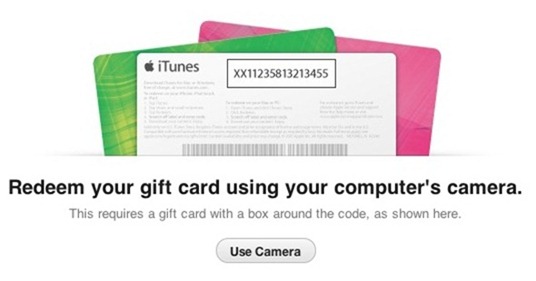
A feature in Apple's iTunes 11 allows you to scan a gift card code using your computer's camera. The feature is particularly intriguing for the blind, visually impaired and for dyslexics. While it may be inconvenient for most people to type the 16 digit code, it is impossible for users who are blind or visually impaired, and can be a struggle for some dyslexics. To use the feature position the gift card in front of the computer's camera. For people with visual impairments VoiceOver, Apple's built in screen reader on your Mac will help you frame the card in the picture. Then iTunes recognizes the code and credits the money to your iTunes account. This feature makes it possible for the blind and visually impaired to easily and independently redeem iTunes gift cards. Maybe this cool scanning feature will make its way to iOS in the near future.

Click read more below to view pictures of the scanning feature in action.

Tuesday, October 23, 2012

Apple Announces iPad mini


Today, Apple announced the iPad mini a 7.9" iPad running iOS 6. The iPad mini is cheaper than the full size iPad with a starting price of $329. The smaller size and lower price could make the iPad mini perfect for teachers and students. Like the full size iPad the iPad mini includes a number of great accessibility features including VoiceOver, Speak Selection, Siri, Assistive Touch, Guided Access and Zoom. These accessibility features makes the iPad mini great for all types of people.

The iPad mini includes a FaceTime HD camera, 5 mega pixel rear facing camera and A5 processor. The 5 mega pixel camera allows OCR and scanner apps to work well. The iPad mini also includes the lighting connector that is smaller and easier to plug in. The iPad mini will be available for pre-order on October 26 and for sale on November 2.  Click read more to view more photos of the iPad mini.

Monday, October 8, 2012

iOS 6: VoiceOver Compatiblity with Maps, Assistive Touch, and Zoom


iOS 6 the latest operating system for iPhone, iPad and iPod Touch includes new VoiceOver enhancements. The enhancements allow VoiceOver users to use zoom, Assistive Touch and maps simultaneously with VoiceOver. These new features are built into iOS 6 so there are no additional downloads. Watch the above video to learn more about VoiceOver improvements in iOS 6.

Tuesday, September 11, 2012

HumanWare Communicator a Great Tool For Deaf-Blind Communication


HumanWare recently released the HumanWare Communicator app for iOS devices. The app is designed to make communication between a deaf-blind person and a sighted person possible.When the conversation is started an introduction is displayed for the sighted user to read. The deaf-blind person uses a Bluetooth braille display to type a message to a sighted person, this message appears on the screen of the iPhone, iPad or iPod Touch.  Then the sighted user can respond using the virtual keyboard and the message will appear on the refreshable braille display. The conversation can then go back and forth with the deaf-blind person typing on the braille display and the sighted user typing on the device's virtual keyboard.

HumanWare describes the app as follows,
"The HumanWare Communicator application is intended to establish a text conversation, through a chat window, between a deaf-blind person and a sighted person. All interaction appears both on the deaf-blind person's refreshable Braille display, as well as visually on the screen of the iOS device."
The HumanWare communicator is available in the App Store for $99.99 for devices running iOS 5.1 or higher. To view screen shots of the HumanWare Communicator app in action click read more below.