Pages

Showing posts with label accessible. Show all posts

Saturday, August 9, 2014

Redbox to Make Some Kiosks Accessible to the Blind


Popular video rental service Redbox agreed in a settlement to make 4,000 of their 35,900 kiosks located in California accessible to people who are blind or visually impaired. The service, which is commonly found in supermarkets and other public areas, is inaccessible to blind or visually impaired users. As part of the agreement, Redbox agreed to add headphone jacks, text-to-speech output, and tactile keyboards to kiosks. The roll-out of accessible video rental boxes will be gradual and is planed to take longer than two years. In the interim, Redbox has also agreed to provide phone support to help blind customers navigate the rental process. It is not clear if Redbox plans to add more DVDs with audio descriptions to benefit its new larger customer base of visually impaired users, but such a plan would seem to make sense. The settlement deal will inevitably increase Redbox's potential customer base by providing access to more people with disabilities. Unfortunately, the settlement seems to only cover a small fraction of Redbox kiosk in California. Hopefully, other kiosk companies will make their services accessible as well.

Tuesday, November 26, 2013

ClaroPDF App: PDF Text-To-Speech and Annotation (Giveaway)


ClaroPDF is an accessible PDF reader with many annotation options. The app uses text-to-speech to read any text based PDF. The app also includes numerous annotations options including highlighting, text boxes, underline, strikeout, shapes, and images. ClaroPDF includes a simple design that matches the interface of iOS 7. Unfortunately, there is no full screen option that hides all controls so you can better focus on your document. To start reading a PDF you can use the open-in feature of many other apps or import a document using Dropbox. Then you can use a number of high quality text-to-speech voices to read the document at up to 240 words per minute. It would be nice to see the maxim speaking rate increased to around 400 word per minutes for people who are able to understand high rates of speech. To start reading the document you can just tap on a word a press the play button.

Currently in version 1.2.6 there is a bug that causes layout issues with certain documents. The issue causes documents to not fill the entire screen.

Besides a great interface ClaroPDF includes a wide variety of annotation options. These annotations are easy to add and manage. ClaroPDF even includes the ability to add voice notes. One option that is not included is the ability to automatically add text notes to every blank in a document. This feature would significantly speed up the process of filling out forms.

ClaroPDF costs $0.99 and works on the iPhone, iPad, and iPod Touch. Watch the video above to see ClaroPDF in action a click read more below to view screenshots of ClaroPDF in action. Click read more below for giveaway details.

Friday, September 21, 2012

Best Apps For Your New iPhone 5


Did you get the iPhone 5 today? Below is a list of apps to make the most out of your new iPhone 5.


Read2Go is the best way to access Bookshare.org books on your iOS device.Bookshare provides free accessible eBooks for people with print disabilities. Click here to learn more about Bookshare. Once you download the app you can download over 150,000 books directly to your device. The best part of Read2Go is that students can easily read books anywhere because of the portability of iOS devices. To learn how to become a member click here.


Learning Ally (formally RFB&D) provides audio books to people with print disabilities. Members must pay a yearly fee in order to download books. To learn about how to become a member of Learning Ally click here.


Prizmo converts a picture of a document into text which can be read using text-to-speech. In short from document to text to speech in just seconds. Prizmo is also the fastest and most accurate optical character recognition (OCR) app I have every tested.


iBooks is Apple's eReader app. It is simple to use and accessible using VoiceOver. With iBook Textbooks students and teachers can download select textbooks onto theiriPad.

Tuesday, September 11, 2012

HumanWare Communicator a Great Tool For Deaf-Blind Communication


HumanWare recently released the HumanWare Communicator app for iOS devices. The app is designed to make communication between a deaf-blind person and a sighted person possible.When the conversation is started an introduction is displayed for the sighted user to read. The deaf-blind person uses a Bluetooth braille display to type a message to a sighted person, this message appears on the screen of the iPhone, iPad or iPod Touch.  Then the sighted user can respond using the virtual keyboard and the message will appear on the refreshable braille display. The conversation can then go back and forth with the deaf-blind person typing on the braille display and the sighted user typing on the device's virtual keyboard.

HumanWare describes the app as follows,
"The HumanWare Communicator application is intended to establish a text conversation, through a chat window, between a deaf-blind person and a sighted person. All interaction appears both on the deaf-blind person's refreshable Braille display, as well as visually on the screen of the iOS device."
The HumanWare communicator is available in the App Store for $99.99 for devices running iOS 5.1 or higher. To view screen shots of the HumanWare Communicator app in action click read more below.

Tuesday, September 4, 2012

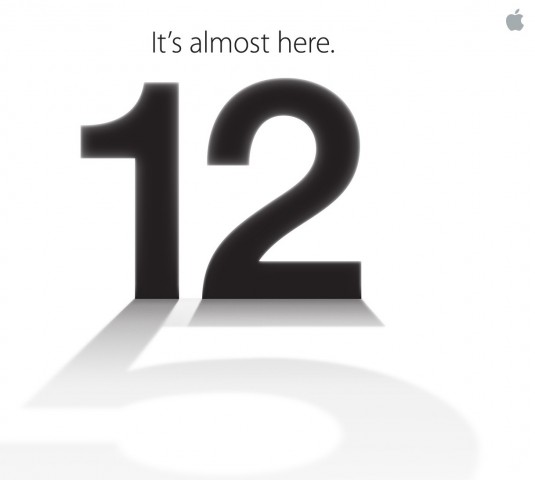
Apple To Hold Special Event on September 12

Number 12 casting a shadow of the number 5

Apple announced today that it will be holding a special event on September 12. Apple is rumored to announce a new iPhone, iOS 6 release data and possibly more. iOS 6 will include many accessibility enhancements including Guided Access. The new iPhone may include a better camera, faster processor and larger screen.

Come back on September 12 to hear all the new from Apple and how it effects the world of assistive technology.

Wednesday, August 8, 2012

BlackBerry Screen Reader Review


The BlackBerry Screen Reader is designed to make BlackBerry phones accessible to the visually impaired. BlackBerry Screen Reader is compatible with the BlackBerry Curve 9350, 9360, 9370, 9320 and 9220.

Installation is complicated and may require the assistance of a sighted person. Unfortutantly, BlackBerry Screen Reader is not built into the phone. There are two methods for installing the BlackBerry Screen Reader. The first method is to visit this webpage from your BlackBerry. Another option for installation is to plug the BlackBerry into your computer and then install the Screen Reader. Connecting your BlackBerry device to your computer is the most accessible option for installation.

Features
  • Physical Keyboard
  • Keyboard Shortcuts
  • Speak Everything On Screen
  • Free For Compatible BlackBerry Devices

Once installed  you will be greeted with a solid Screen Reader that makes the BlackBerry accessible. The visually impaired user benefits from the numerous physical buttons, including a full physical keyboard. Five buttons on the device are less tactile. These buttons include the answer, end, menu, back and end/off. While these buttons are flush with the device they are still used for the visually impaired once there location has been memorized. To be clear these buttons depress when pressed. The physical keyboard makes it possible to type eyes-free. Once you move away from the physical buttons and start navigating the screen, a text-to-speech voice begins speaking everything under your cursor. The BlackBerry I tested had a very loud speaker that made hearing the voice easy. To navigate the cursor you can use the trackpad. The trackpad is fairly sensitive so it may be best to turn down the sensitivity. Also, I found it helpful to turn on audible clicks when the cursor moves from one object to another. The BlackBerry Screen Reader also excels with the use of keyboard shortcuts. For example you can press a key combination to speak the time. Users can change the speech rate, verbosity and pitch.

Overall the BlackBerry Screen Reader is a solid screen reader that makes the BlackBerry accessible for visually impaired users. It is not as polished as other mobile screen readers such as Apple's VoiceOver. BlackBerry Screen Reader may not work with third party apps. Some work could be done in streamlining operations and stability. Also, the screen reader should be built into the BlackBerry from the start. Click read more below to view screenshots of the BlackBerry Screen Reader.

Wednesday, May 16, 2012

Flipboard Updated to Support VoiceOver


Today, Flipboard was updated to support iOS VoiceOver. The update finally allows people who are blind, visually impaired or have print disabilities to access Flipboard. For those who are unfamiliar Flipboard is a popular news and social app for the iPhone, iPod Touch and iPad. Click here to download Flipboard for free.

Tuesday, April 3, 2012

Learning Ally Audio App Updated But Still Missing Key Features


Today, the Learning Ally Audio app was updated to version 2.0.4. The Learning Ally Audio app costs $19.99 from the App Store. You must be a Learning Ally (formally RFB&D) member to use the app. The app allows members to listen to audio books downloaded from Learning Ally on the go. The update adds the ability to download books over the web without having to connect and sync with iTunes. It also has minor user interface improvements.

On the downside the app does not allow users to listen to their audio books in the background. In other words, you cannot listen to your books while you view the printed text in another application. This feature is very important for sighted users who want to read the printed text of an iBook with the audio support. You also can't check your email, browse the web or anything do anything else. Once you close the app, play back stops. iOS has had the ability to play background audio for over a year, but Learning Ally has yet to adopt the feature. 

If you are a Learning Ally member the Learning Ally Audio app is a great buy. If your not a member you cannot use this app. Read2Go, Bookshare's iOS app, is a more polished app. Click here and here to learn more about Learning Ally.

Sunday, March 25, 2012

Haptic Feedback Tablets Helps Visually Impaired Students


Haptic feedback tablets are opening new doors for students with visual impairments, especially in math class. Haptic feedback  provides a small vibration when the screen is touched allowing you to feel the screen. Haptic feedback is available on some Android phones and tablets. Some schools have begun to use tablets that vibrate went touched to allow visually impaired students to feel shapes and graphs. In order to work, a specialized app must be paired with a tablet that offers haptic (touch) feedback. When a student runs their finger along the screen they feel small vibration that tells them where a point or shape is. Then the student can feel the shape. The app could also be used as a graphing calculator in the future, allowing students to input equations and then feel the shape of the graph instantly. The app is not currently available to the public. To read more about this exciting new technology click here.

Wednesday, November 23, 2011

Dragon NaturallySpeaking


Dragon NaturallySpeaking is a speak recognition program that allows you to control your computer and dictate with your voice. Dragon NaturallySpeaking includes a headset with a microphone for uses with the program. Dragon NaturallySpeaking has excellent speak recognition accuracy at fast speeds. Dragon allows users to browse the web, write emails and compose and edit Microsoft Office documents with your voice. In addition Dragon can transcribe audio files into text after it was recorded. For example, if you are on the go you can record your voice with an audio recorder and then uses Dragon to make a text document from the audio file. Dragon has numerous commands that you can use to control your computer. You can say, "search the web for..." or "correct that" or "strike that" or 'scroll down" along with many other commands. Because their are so many commands there is a learning curve for new Dragon users. Luckily once you learn the commands that you will use most Dragon can improve the time it take you to perform common tasks. Dragon's speech recognition accuracy is very good out-of-the-box but you can train Dragon by reading text aloud to help improve the accuracy. Creating text documents with Dragon is also quicker and easier with voice. Using Dragon it is easier to get your ideas down on paper and using voice is much quicker than typing. If you have an iOS device you can use it as a remote microphone using the Dragon Remote Microphone available here. To learn more about other Dragon products from Nuance click here, here and here. This product was provided complementary to the reviewer.

Saturday, October 8, 2011

SoundAMP Turns Your iOS Devices Into a Hearing Aid


SoundAMP is a app for your iPhone, iPad and iPod Touch that turns your device into a hearing aid. The full version of the app costs $4.99 and the lite version is $0.99. Click here to download the full version. Click here to download the $0.99 lite version. The app uses your devices built in microphone the capture the sound and then amplifies the sound through your head phones. SoundAMP can also record the sound and play it back to you later. There are numerous uses for this app including lectures, plays, movies, watching TV and much more. Click read more below to see screen shots of the app in action.

Monday, October 3, 2011

Braille Gift Cards


Plastic credit cards and gift cards feel identical to one another making them indistinguishable to blind and visually impaired users. Starbucks and other retailers have a solution, credit cards or gift cards with braille. Gift cards and credit cards like the one pictured above have braille labels that makes them easy to tell apart. Now there is no need to guess if you are giving the cashier your metro card, credit card or Starbucks gift card. Starbucks description of the braille gift card,
"Our Fall 2011 card is all about the brilliant colors of autumn’s changing leaves. But given that October is also National Disability Awareness Month, we thought we’d take this opportunity to release our first Starbucks Card with Braille lettering so that all can share."
To order the braille gift card click here.