Pages

Saturday, February 1, 2014

What's on my iPad? Assistive Apps I Use as a Dyslexic Student


As a dyslexic high school student my iPad, with a number of assistive apps, has become a very valuable tool. With my iPad I can read and fill out a PDF using text-to-speech, read a book with Voice Dream Reader, or map out my ideas with Inspiration Maps. The iPad mini is a perfect size for my needs allowing me to read sitting up, or reclining comfortably while listening to a book. Before I got the iPad I would either be tied to a computer to read using text-to-speech, or reading on the tiny screen of my iPhone. Here's a list of my favorite iPad apps and how I use them to help me both in and out of the classroom.


Voice Dream Reader is a text-to-speech reading app that allows users to read a wide variety of files through the app. The app includes the ability to buy very high quality text-to-speech voices for use with the app. Voice Dream Reader allows you to highlight  important parts of a passage as you read along.. One of my favorite features is the ability to download and read Bookshare books from within the app. Currently  Voice Dream Reader does not support  Bookshare books with images, but hopefully will add that feature in the near future. In all Voice Dream Reader is a must have for anyone who prefers reading with text-to-speech.

Click here to read a full review of Voice Dream Reader.

Read2Go is another app for reading Bookshare books. Bookshare provides accessible digital books to members. Using Read2Go users to keep their books at their finger tips all the time. The app has a choice of two text-to-speech voices. While Read2Go does not have as many features as Voice Dream Reader the support it has for books with images is a plus.

Click here to read more about Read2Go.

The free Learning Ally Audio app allows Learning Ally members to download and listen to their audio books on the go. The app has useful features such as bookmarking and playback is easy to control and customize. Learning Ally is starting to add digital text to some of their books so users can follow along with the text while listening to the human narrated audio book.

Click here for more information about Learning Ally Audio app.

Click read more below to learn about many more great apps.

Tuesday, January 21, 2014

Google Smart Contacts May Help Monitor Blood Sugar in the Future


Google is rapidly developing new wearable technologies. Google's first attempt at wearable technology, Google Glass, has attracted a lot of press attention, but is still not available on the mass market. They also cost $1,500. Google's next foray into wearable technology maybe less flashy and less expensive, but may have a greater assistive technology impact.

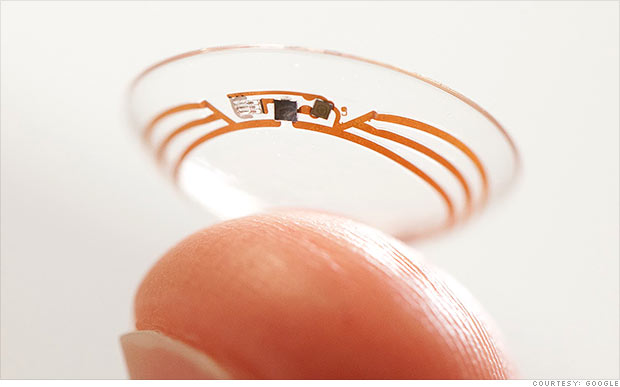
Google's smart contact will sit on the eye like conventional contacts, but do much more. Google's initial idea is to measure blood sugar in tears for diabetics with electronics integrated into the contact. Instead of drawing blood to monitor blood sugar Google's smart contact would analyze blood sugar within tears. This system would eliminate or reduce painful finger pricks and also allow for more frequent testing. A small LED light inside the contact would then illuminate different colors depending on the blood sugar reading.

While this technology is still in development the idea is very exciting. If smart contacts could benefit diabetics maybe Google can adapt them to benefit people with other disabilities or conditions. Could a contact detect sound and give a visual notification to a deaf user? Imagine this, a smart contact for the deaf senses volume of sound and direction and notifies the user. A loud sound off towards a user's right side would illuminate the right LED very brightly while a soft sound off towards a user's left would dimly illuminate the left LED. While Google has only confirmed smart contacts are in testing for blood sugar testing it is exciting to think about the possibilities five or ten years down the line. Hopefully smart contacts for blood sugar monitoring will reach the market sooner than later and will assist people with diabetes.

Click read more to view a short video about Google smart contacts.

Microsoft and GW Micro Team Up to Offer Window-Eyes Free to Office Users


GW Micro, the makers of the Window-Eyes screen reader, has teamed up with technology giant Microsoft to offer Windows-Eyes to Microsoft Office 2010 and newer users for free. Windows-Eyes can read elements on the screen aloud allowing the blind, low-vision, and print disabled to have full access to their Windows PC. Window-Eyes can also output on-screen content to a Braille display for users who prefer Braille. This new partnership will increase the affordability of Window-Eyes and allow more people to benefit from its features. Window-Eyes normally costs almost $900 while Microsoft Office costs far less. GW Micro and Microsoft believe this new partnership will allow millions of new users to access their computers using Window-Eyes. Rob Sinclair, Microsoft's Chief Accessibility Officer says the following about this new program,
"By partnering with GW Micro in this endeavor we are demonstrating Microsoft's onging commitment to provide all of our customers with the technology and tools to help each person be productive in both their work and personal lives."
This announcement is very significant in the world of assistive technology. This deal will allow millions of users to increase the usability of their computers for free if they already own Microsoft Office. Owners of Microsoft Office 2010 or higher can download Window-Eyes by visiting WindowEyesForOffice.com and following the instructions on screen.

Wednesday, January 1, 2014

PDF Expert 5: Well Designed PDF Management App with Text-to-Speech


PDF Expert 5 is a well designed PDF management app for the iPad. The app includes many useful features that allow you to read, edit, and annotate PDF documents easily. Unlike some other feature -rich apps, PDF Expert 5 does not feel cultured. The elegant design makes the app easy to use. PDF Expert is an assistive app because of its text-to-speech integration with the added benefit of extra features.

One caveat, while the app is good for non-disabled and dyslexic users, I would not recommend the app for VoiceOver users because of some VoiceOver problems I have found. Readdle, the maker of the app, should work on fixing these VoiceOver problems so blind and visually impaired can also benefit from the app. 

PDF files can be imported from numerous cloud storage services including Google Drive, Drop Box and SkyDrive or using the "open-in" feature of many other iOS apps. You can also view other file types, but the built in text-to-speech reader is only available for PDF documents. Files can be organized into folders or dragged and dropped into different sections.

PDF Expert's text-to-speech function works with any PDF with digital text. It does not work with PDF documents that have text within images. To read a compatible PDF, turn on text-to-speech in the reading mode menu and then press play. You can start reading at the middle or end of a page by highlighting a word and pressing "read from here." Text is read with the default iOS voice that many may recognize as the voice of Siri. Unfortunately, you cannot purchase additional higher quality voices. The app also requires you to re-enable text-to-speech every time you switch PDF documents. This is inconvenient if you switch are between PDF documents quickly.

Click read more below to continue reading about PDF Expert.

Sunday, December 29, 2013

Use If This Then That (IFTTT) to Automate Simple Tasks

If This Then That (IFTTT) is a simple app for iPhone and Android that allows you to automate simple tasks. If you want to email every picture you take to your grandparents or tweet about every breaking news story IFTTT can do it for you automatically. The IFTTT app integrates with many other apps and services which allows it to help with a variety of  tasks. IFTTT can integrate with reminders, contacts, photos, messages, Twitter, Google Drive, Facebook, Blogger, Evernote, and many more services.

To start using the app you can choose from hundreds of pre-made recipes or make your own. A recipe could say " If I post a new post on Blogger, tweet its title and a link, "or  "when I arrive at school,text my mom" The app constantly checks your recipes and completes the action at the correct time. It reduces the need to do many monotonous tasks. It also bridges the gap between different web based services allowing you to spend more time using the services and less time managing your digital life.

IFTTT also integrates with certain connected home systems. Using IFTTT in concert with the WeMo connected home platform you can have your lights turn on automatically when you get close to home or turn off the TV when you are far from home.

Some of these recipes can be helpful for people with executive functioning difficulties. For example, the app can automatically check the weather, and if it is going to rain remind you to wear a jacket. The possibilities are almost endless because of the customization the app offers. The app can also complete actions based on your location. You can set up the app to call, email, or text message someone when you arrive or leave a certain location. This could be helpful for parents who need to makes sure their kid has arrived to school safely in the morning. For example, you could set your childs iPhone to email you everytime they arrive or leave school.

IFTTT has an iOS app and website both are free of charge. Click read more below to view screen shots of the IFTTT app in action.

Thursday, November 28, 2013

Made for iPhone Hearing Aids to be Avalible in Early 2014


Apple announced Made for iPhone Hearing Aids along side iOS 6 now the first Made for iPhone Hearing Aids are set for release. Apple's partnership with GN ReSound helped to create the LiNX hearing aid. The LiNX connects directly to the iPhone using a special wireless technology. Unlike other hearing aids the LiNX does not use an intermediary device to communicate with the iPhone. Apple says the following about Made for iPhone Hearing Aids on their accessibility webpage.
"Apple is working with top manufacturers to introduce hearing aids designed specifically for iPhone. They’ll deliver a power-efficient, high-quality digital audio experience, and will allow you to manage your hearing aid right from your iPhone. Just look for the Made for iPhone label. Explore the FCC's hearing-aid compatibility (HAC) ratings of iPhone."
A companion app allows users to change settings directly from their iPhone. The LiNX will cost $3,000 and will be available in 2014. 

Tuesday, November 26, 2013

ClaroPDF App: PDF Text-To-Speech and Annotation (Giveaway)


ClaroPDF is an accessible PDF reader with many annotation options. The app uses text-to-speech to read any text based PDF. The app also includes numerous annotations options including highlighting, text boxes, underline, strikeout, shapes, and images. ClaroPDF includes a simple design that matches the interface of iOS 7. Unfortunately, there is no full screen option that hides all controls so you can better focus on your document. To start reading a PDF you can use the open-in feature of many other apps or import a document using Dropbox. Then you can use a number of high quality text-to-speech voices to read the document at up to 240 words per minute. It would be nice to see the maxim speaking rate increased to around 400 word per minutes for people who are able to understand high rates of speech. To start reading the document you can just tap on a word a press the play button.

Currently in version 1.2.6 there is a bug that causes layout issues with certain documents. The issue causes documents to not fill the entire screen.

Besides a great interface ClaroPDF includes a wide variety of annotation options. These annotations are easy to add and manage. ClaroPDF even includes the ability to add voice notes. One option that is not included is the ability to automatically add text notes to every blank in a document. This feature would significantly speed up the process of filling out forms.

ClaroPDF costs $0.99 and works on the iPhone, iPad, and iPod Touch. Watch the video above to see ClaroPDF in action a click read more below to view screenshots of ClaroPDF in action. Click read more below for giveaway details.

Monday, November 25, 2013

Livescribe 3 Smartpen: Do More With Your Written Notes


By combining the ease of hand writing, the power and accessibility of Apple's iOS devices, and audio, the Livescribe 3 Smartpen is a powerful tool.  With the smartpen you can start writing on a pad of paper and see your handwriting appear on your iPad or iPhone almost instantly.

When taking notes It can record audio that is linked to your handwriting, allowing you to easily hear what was happening exactly when you were writing.  It can easily search through notebooks of handwritten pages to find the right note in an instant, and it allows you to share your notes with anyone without copying or scanning.

The Livescribe 3 Smartpen is not just a refinement of last year's Sky Wifi Smartpen. The Livescribe 3 Smartpen adds new functionality by pairing it with an iPhone, iPad, or iPod Touch. The Livescribe 3 is still capable of syncing handwriting and audio, but instead of recording the audio from a built in microphone, the recording happens on an iPhone or iPad paired to the pen with Bluetooth. With the pen connected to an iOS device using Bluetooth, features like handwriting recognition and cloud based storage options are handled by the iOS devices. Most of the pens functionality is handled with the free Livescribe+ app that seamlessly manages the Smartpen.

Read on to find out more about the Livescribe 3.

Thursday, November 21, 2013

Fantastical Makes Staying Organized Easy


Fantastical 2 is a well designed calender app for the iPhone. Many say Fantastical is the calendar app Apple should have made and I would agree. Just like the default calender app for the iPhone Fantastical is easy to use and syncs with all of your online calenders. But Fantastical includes some great features that makes scheduling, managing, and viewing your calender events easy. Thes are features that the default calender app does not include. Creating events is easy, you can type or speak in natural language to create an event. If you type "lunch with study group at 1 in library" the app will automatically fill the correct information into a new calender event.

Fantastical also includes a five day view that gives a great visual look at your week ahead. The month view also provides more visual information than the default calender app. Fantastical also integrates with Reminders and displays your Reminders along with your calender events. The app includes many features that allows users to customize the look and function of the app.

Fantastical's visual design  and easy event creation feature makes staying organized easy. Fantastical can help people with memory loss or executive functioning difficulty to stay organized. With Fantastical you only have to check one app to keep up with your calender and reminders.

Fantastical's latest update improved VoiceOver compatibility, but there remains some very minor VoiceOver issues. These issues make learning how to use the app slightly harder for VoiceOver users, but once familiar with the function of the app VoiceOver users should have no problem using the app. The developer has expressed that they take accessibility seriously which is great to hear.

Watch the above video to see Fantastical 2 in action and click read more below to view screenshots of the app. Fantastical 2 for iPhone costs $2.99 on the App Store.

Monday, November 11, 2013

Bookshare Offers Free Membership to Disabled Veterans Attending School


Bookshare recently announced that they will be providing free membership for disabled veterans who are currently attending a United States college or university. Bookshare also serves disabled civilian students and others with print disabilities by providing free downloadable accessible books. Veterans who qualify, but are not enrolled in school will have access to a 30 day free trial. After the trial veterans continue using Bookshare for a $50 yearly membership fee. Especially on Veterans Day it is great that veterans who are disabled will be able to access over 215,000 accessible books from the Bookshare library. Bookshare's press release says,
"Accessible books can break down reading barriers and open a new lifeline to reading to go back to school, learn a new vocation or read for pleasure."
A membership provides an individual with electronic books that can be read with text-to-speech or used with a braille device. This makes reading possible for people who are blind, low vision, physically disabled, or dyslexic. Interested veterans can find more information by visiting Bookshare's veterans site. People interested in Bookshare who are not veterans can visit Bookshare.org.